
Fully Customizable. API Integration.
The best sitemap creation tools for WordPress
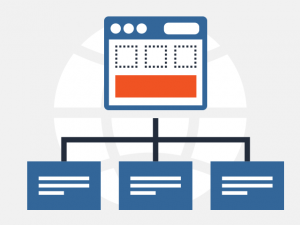 Whenever you start a brand new website or begin optimizing an existing one, creating a sitemap should be high on your list of priorities.
Having a sitemap makes your website more easily accessible to search engine crawlers. This, in turn, can lead to faster page ranking, better SERP positioning and lots of new website visitors.
Today, we want to highlight the importance of sitemaps and show you the best sitemap creation tools for WordPress.
What is a sitemap?
A sitemap is an XML (Extensible Markup Language) or an HTML (Hypertext Markup Language) file which contains each web page’s URL from a given website. It also stores the essential URL-related metadata, such as the time of the most recent web page update, its place in the hierarchy of a given website and how often it is updated.
Thanks to XML file sitemaps, search engines can quickly crawl through a given site. They do this in order to index each and every web page and eventually return it as one of the results whenever a user searches for something relevant to its content.
As stated by Google, a sitemap is recommended in the following cases:
- your website is new and contains a small number of backlinks
- you have a large (content-heavy) website
- the content of your website isn’t interconnected with multiple links, so navigation is difficult
- you have a website with a large amount of multimedia content
The best sitemap generation tools
SEO Spider
Price: Free for 500 URLs /£149.00 per year for more

One of the most popular spider tools among SEO professionals is the Screaming Frog SEO Spider.
It’s the additional features that set the SEO Spider apart from the competition. It will not only crawl your website and export the URLs in an XML sitemap, but it will also look for broken links and duplicate content and it will review the meta tags and the redirects, etc.
The Screaming Frog SEO Spider has a free version that can scan and analyze up to 500 URLs. For more URLs and additional features, as well as Google Analytics and Search Console integration, you will need an annual license.
The SEO Spider is available for both Windows, macOS and Ubuntu.
PowerMapper
Price: 30-day Free Trial / $49 per month

PowerMapper offers another collection of SEO tools, similar to Screaming Frog. However, the PowerMapper suite also offers an on-demand cloud-based version with a 30-day free trial and more competitive pricing.
The unique proposition of PowerMapper is the speed and ease-of-use. They advertise single-click sitemap generation in just a few minutes. Your ready sitemaps can be exported in XML or in CSV file format. What’s more, PowerMapper allows you to create visual sitemaps with multiple styles.
In addition to the sitemap generation service, the on-demand suite from PowerMapper also features spell check, broken links check, W3 validation check and browser compatibility check.
XML Sitemap Generator
Price: Free for 2000 pages

If you are looking for a completely free solution, XML Sitemap Generator will scan up to 2000 pages of your site for free. This is a great offer, considering that most online sitemap generators will go only up to 500 pages.
Other than the sitemap generation, XML Sitemap Generator does little else. You can still specify the page update date, change frequency, and page priority, but that’s all. The final results will also include a list of broken links if there are any.
Once the tool has finished its job, it can email you the results, so you don’t have to keep the website open and wait for it.
Aside from the online version, the same developers also offer a free WordPress plugin and a free Windows desktop application, both of which come with more features.
Check Domains Sitemap Generator
Price: Free for unlimited pages / $24.95 for additional features
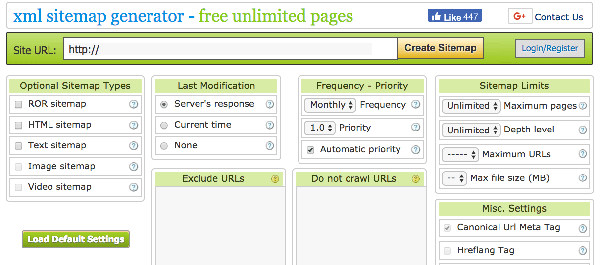
Another online sitemap generator, the Sitemap Generator from Check Domains can crawl your whole website, no matter how many pages you have.
What is unique about this tool, aside from the unlimited number of pages crawled, is that you can specify a list of URLs which you don’t want crawled or which you don’t want to appear in the finished sitemap at all.
It’s a great tool if you have a fairly large website with tons of small pages, but keep in mind that larger sites will take longer to fully crawl, and you may end up hitting a memory limit.
Aside from the free version, Check Domains also offer a premium version with a lot more options, such as: images sitemap, video sitemap, results by email and more.
XML Sitemaps (plugin)
Price: free

The XML Sitemaps WordPress plugin will not only generate sitemaps for you, but it will also monitor site activity, automatically update the sitemap and ping search engines to notify them of the updates.
Another advantage of the XML Sitemaps plugin is that it will use the native WordPress hooks to actually scan your websites, which means it will play nice with custom query strings or third-party solutions like Semiologic SEO.
Google XML Sitemaps (plugin)
Price: free
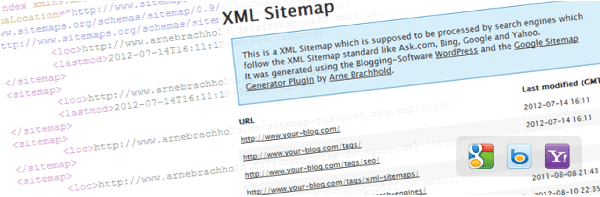
One of the top rated plugins in WordPress history with more than 1.700 5-star reviews and over 2 million active installs, the Google XML Sitemaps plugin should be definitely on your list.
It will automatically generate a sitemap from all of your pages and blog posts, automatically update every time you publish a post and automatically notify search engines of changes in the sitemap.
It is also translated into multiple languages.
I have my sitemap, what’s next?
There are just a few more things that you need to take care of, once you have created your sitemap. You should double-check it for any errors, upload it to your website and finally – submit it.
To double-check your sitemap, simply open the newly-generated file and see if all of your pages are in there. Once you are ready, upload the file to your website, preferably in the root folder – my-site.com/sitemap.xml.
You can now submit your new sitemap directly to Google or Bing. Here is how to do it:
How to submit your sitemap to Google Search Console:
1. Select your website in the Seach Console.
2. Go to the left sidebar and click on Crawl, then Sitemaps.
3. Press the Add/Test Sitemap button which is positioned in the top right corner.
4. Enter the address of the sitemap into the text box that appears.
5. Click Submit.
How to submit your sitemap to Bing Webmaster Tools:
1. Go to your website dashboard.
2. Click “sitemaps” in the “configure my sitemap” dropdown on the left.
To ensure that other search engines, except for Google, Bing and Yahoo can also find and use your sitemap, list it in your robots.txt file. Doing that is really simple, you just need to specify the URL of the sitemap. Here is the exact code:
Sitemap: https://www.example.com/sitemap.xml
******
Generating a brand new sitemap is a quick and simple process. No matter what tool you use, it will take you less than 10 minutes to get started. And with little effort, you can greatly assist the search engines in crawling, indexing and ranking your site. In the end, this could result in better rankings.
And remember – update your website’s sitemap on a regular basis.
Leave a Reply