
Fully Customizable. API Integration.
WordPress Hosting Reseller Plugin version 1.3 is out
 Hot out of our developers’ workshop, the latest version of our WordPress Hosting Reseller Plugin addresses lots of reported bugs, makes several improvements to existing functionality, updates several pages and adds some new ones. Our reseller hosting themes have also been updated to support the new pages and improvements.
You can update the plugin and theme from the WordPress admin area.
How to save modified pages with the WordPress Hosting Reseller Plugin
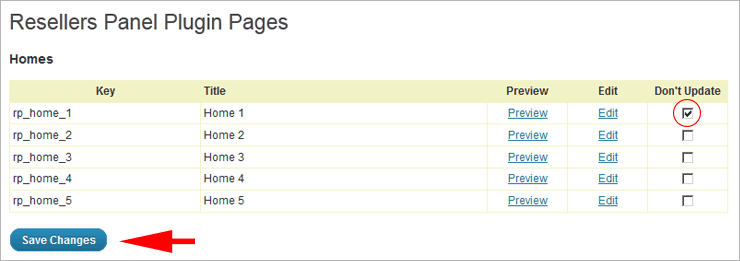
If you have made any changes to the content, be that a modified letter or a new HTML element, you have to ‘lock’ this page, otherwise your changes will be overwritten.
To do so, go to the admin area, click on ‘Pages’ and mark the ‘Don’t Update’ checkbox for each page that you want to ‘lock’. This way you will keep your modifications intact. Don’t forget to click the ‘Save Changes’ button (the pages are divided into different sections and each section has such a button). It’s important to do this before you update the WordPress Hosting Reseller Plugin.
Another thing you have to keep in mind is that our WordPress Hosting Reseller Plugin needs to download large amounts of data from our servers. This is why the update procedure can be a little slow. Feel free to go and make yourself some coffee while the automated installer does its job. Don’t close or refresh the page – this can break the update. Wait until you see the ‘Plugin successfully activated’ message – this means that everything is now ready.
For those who still don’t have the WordPress Hosting Reseller Plugin, you can get download it for free (requires free account with ResellersPanel.com) or you can check out a live demo.
I’d like to give a suggestion to developers, please add a custom favicon option in the theme options for those , who don’t know that how to add favicon for wordpress.
Thanks for reply, after checking the server, i got this error is from my host side and i’m trying to contacting Godaddy to resolve the problem.
After update of this plugin , my website’s server not opening my site, it is showing error.
may be, it happened by my host or may be by this plug in .
but i’m checking , what happened.
Hello Harshvardhan,
The best way to solve this problem is to contact the suppor technicians. If your WordPress website is hosted with ResellersPanel – our techs will get back to you with an answer in less than 1 hour.
Hope your problem gets fixed as soon as possible.